 Rundeck
Coding agents on your phone
Your AI agents, on a leash.
Step away from the Mac without stalling your agents. Rundeck shows every Claude Code and Codex session on your iPhone, and lets you answer them from wherever you are in the house.

Every session, sorted by what needs you
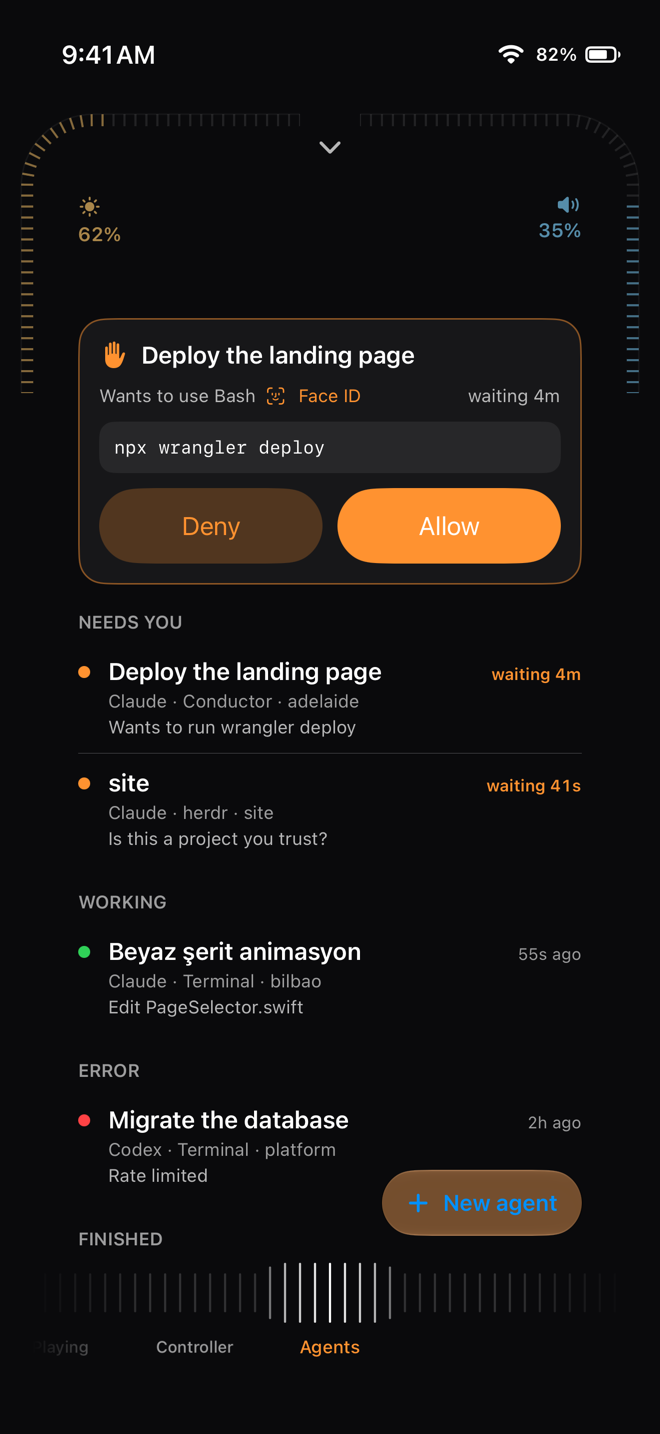
Claude Code and Codex sessions on your Mac — in Terminal, Conductor, herdr or the desktop apps — appear on your iPhone sorted by what needs you: waiting first, then working, failed and finished, each with its latest step.
Allow, deny, or say what instead
When an agent asks to run a command, the request appears on the phone with the exact command. Allow it, deny it, or reply with what it should do instead — and the agent carries on.
Face ID before anything risky
Commands that delete, overwrite or deploy are marked risky, and allowing one asks for Face ID first.
Message and start agents
Open a session to read its transcript and send it a message for its next step, or start a new agent in a folder with herdr, Rundeck's bundled agent multiplexer.
Private by design
No account and no cloud: your iPhone talks straight to the Mac, so your code and commands never pass through a server of ours. Coding agents are part of Rundeck Pro.
Questions
Which coding agents does Rundeck support?
Claude Code and Codex, wherever they run on your Mac: Terminal, Conductor, herdr and the desktop apps.
Does my code leave my network?
No. Rundeck has no servers in the path; the iPhone and the Mac talk directly.
What happens if I don't answer?
If the app is not connected, Claude Code asks at the Mac as it always would. While the phone is connected, a request waits up to about a quarter of an hour for your answer.